Sidequest
Sidequest gives Claude Code a local board for planned work. It groups tickets into stories, keeps the backlog visible, and runs delegated work through a repeatable review and delivery flow. That flow works for Git codebases and filesystem snapshots of non-Git documentation trees, vaults, and research collections.
Install
Section titled “Install”Install Sidequest for the project you are working in:
/plugin marketplace add poindexter12/loadout/plugin install sidequest@loadout --scope projectReload Claude Code or start a new session after installing. Sidequest packages its executor roster with the plugin, so Claude discovers every routed executor when it loads the plugin, before SessionStart maintenance. You can also run /quartermaster:setup and let Quartermaster install and configure Sidequest for the project.
Sidequest is local. The dashboard runs on your machine and ticket data stays in the local Sidequest store.
Your first workflow
Section titled “Your first workflow”- Open the board with
/sidequest:board, or tell Claude to show your Sidequest board. - Describe the outcome you want and ask Claude to plan it as Sidequest work. For example:
Plan the checkout refresh as a Sidequest story and show me the backlog.If work belongs on a feature branch, name that branch in the request. - Review the proposed tickets, dependencies, and scope in the board. Adjust the plan before work starts.
- Ask Claude to dispatch the ready tickets. Claude chooses the configured route, starts the work, and reports verification results. Dispatch freezes each ticket’s intended target branch, so two concurrent feature branches get separate targets without changing the board default. Work goes out by priority, urgent first, then high, normal, and low. If Claude dispatches a ticket while unblocked work at a higher priority is still waiting, the board names that work in the dispatch result. Asking for a specific ticket by name still works: Claude records that you asked for it, and the board stops flagging that dispatch.
- When a ticket is ready, ask Claude to review and integrate it if the checks pass. Larger or higher-risk work may need an extra review before integration.
Each ticket carries a check that decides whether its work is ready. Claude records that check against the final candidate and reports what passed, failed, or needs your decision. The agent-facing reference covers capture, evidence, and delivery mechanics.
Choose the planning depth
Section titled “Choose the planning depth”Use the lightest planning that fits. Exact small changes and operational asks can stay lightweight. Substantial or ambiguous work starts with a visible surgical contract: the outcome, non-goals, smallest authority needed, scope, bounded oracle (the check that decides whether it worked), and review limit.
Claude asks one batched question round for consequential choices. If the approach is genuinely contested, it may offer bounded agent proposals. Do your thing, use your judgment, and similar phrases delegate decisions for the current feature or story, not for future work.
Review stays tied to the pinned contract. If two candidate fixes are rejected in the same defect chain, stop patching and replan before trying another candidate.
The board keeps the work visible while Claude and its executors handle the ticket lifecycle. A Git ticket submits a verified range; a non-Git ticket submits a verified project snapshot. Claude reports any unavailable capability or failed delivery instead of guessing around it.
Delegation with Sidequest
Section titled “Delegation with Sidequest”Sidequest does not refuse other agents. When the main session spawns an Agent that is not a Sidequest executor, such as general-purpose, a GSD agent, or a third-party plugin agent like sg:spec-interviewer, Sidequest runs it in the background and changes nothing else: the agent keeps its own definition, permission mode, model, and isolation. This applies whether or not the project has a board. Explore, claude-code-guide, and statusline-setup still run in the foreground as before.
A background agent is not a ticket executor. It has no claim and no briefing, so board work still goes through a ticket and the executor that dispatch returns, and an ordinary agent whose prompt carries a dispatch briefing or a [sidequest-...] marker is refused. For a one-off investigation you want on the board, file and dispatch a spike ticket, usually in the codebase-exploration category.
Some agents need the foreground, for example an interviewer that asks you questions as it goes. List those types under a sidequest key in Claude Code’s own settings:
{ "sidequest": { "foregroundAgents": ["sg:spec-interviewer"] } }Put it in your user settings.json (under CLAUDE_CONFIG_DIR, default ~/.claude) for every project, or in a project’s .claude/settings.json or .claude/settings.local.json for that project. Claude Code loads a settings file carrying this extra key without complaint. The most specific file that defines the key wins outright: a project list replaces your user list instead of adding to it, and "foregroundAgents": [] in a project clears it there.
Use the dashboard
Section titled “Use the dashboard”The project rail keeps every registered board in one place, with ticket counts and status progress beside each project. The combined view is useful when you want to scan ownership, priorities, labels, stories, and routes across the whole queue.
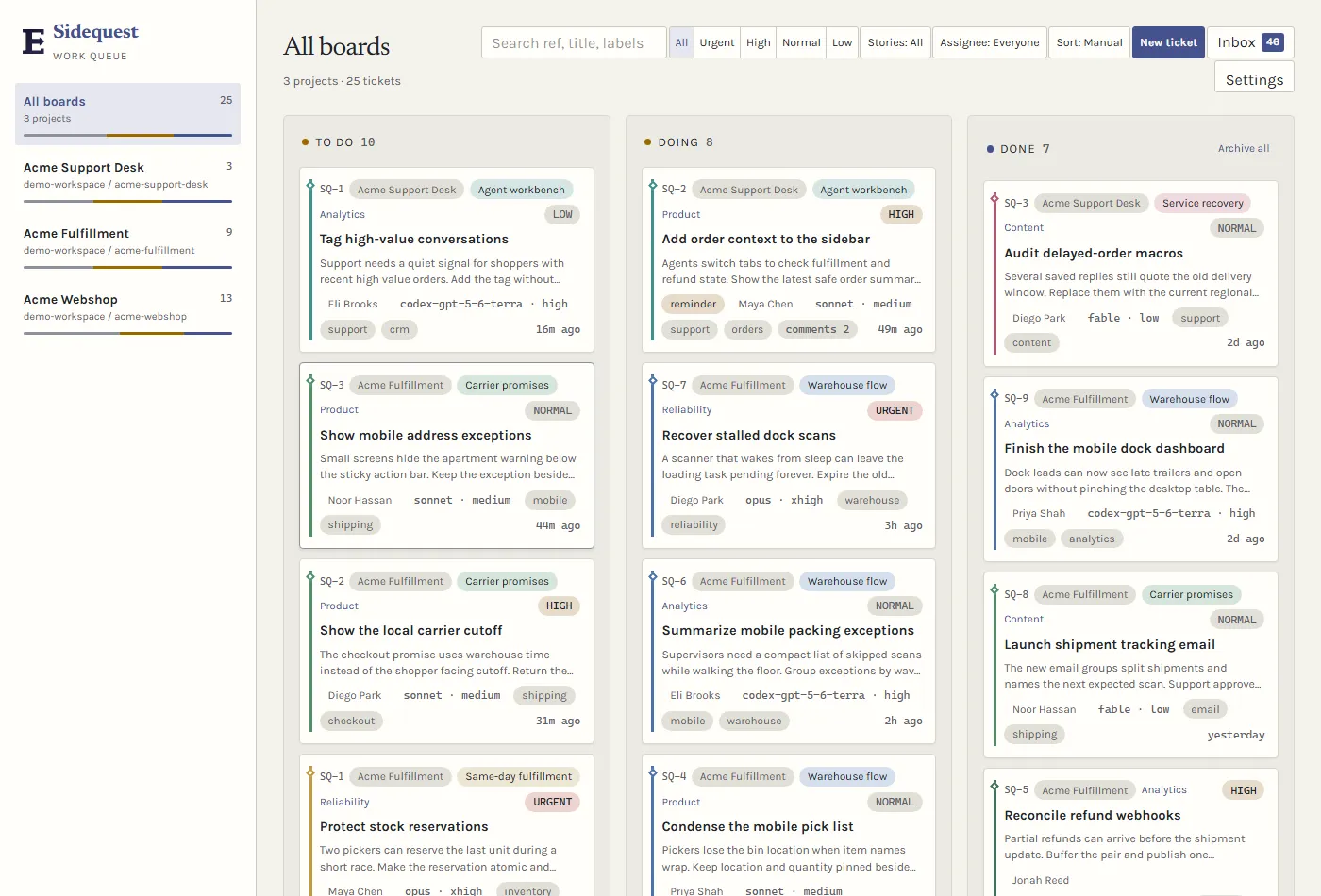
Synthetic demo data showing three active project boards and 25 tickets.
Select a project in the rail when you need its focused board. The columns keep that project’s open and completed work visible without losing the rest of the rail.
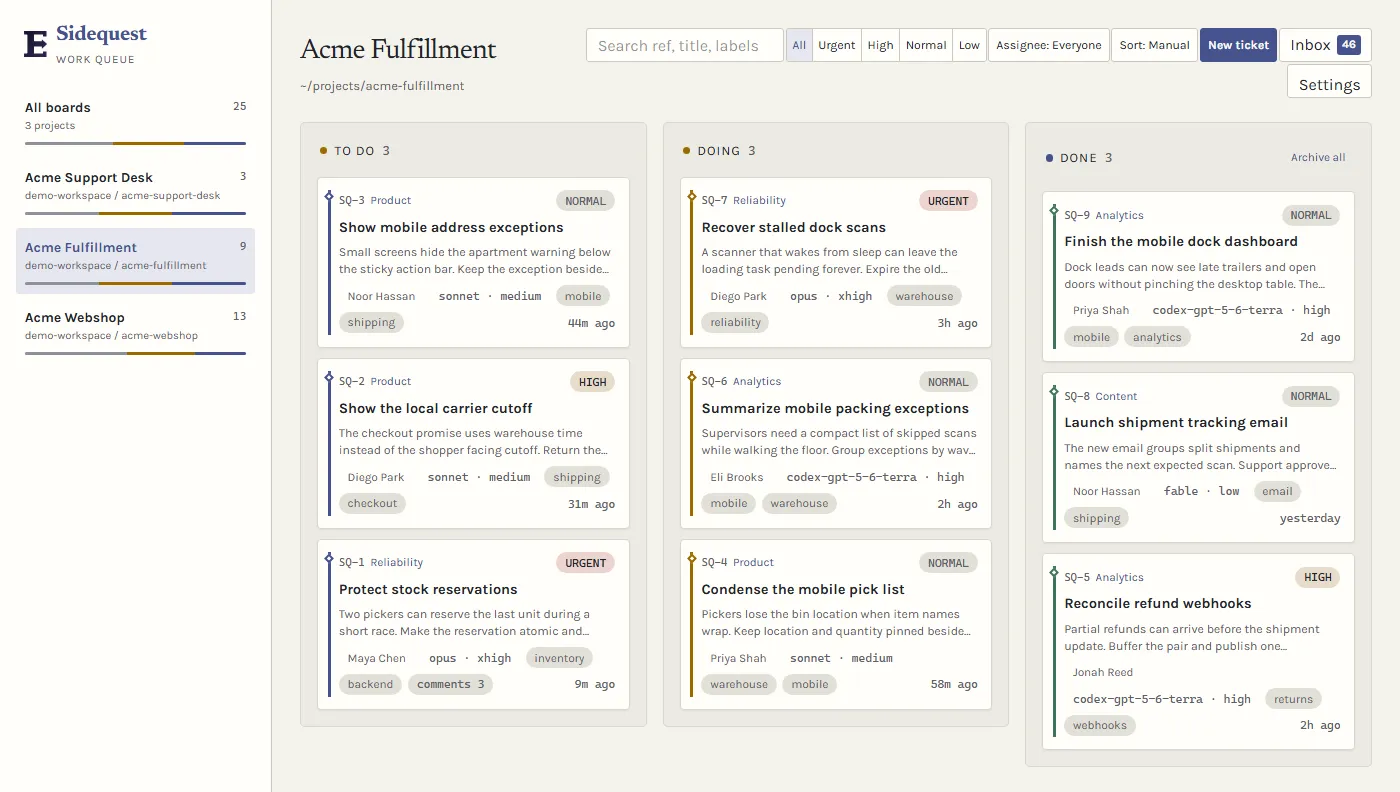
Synthetic demo data showing nine active Fulfillment tickets across todo, doing, and done.
The toolbar searches refs, titles, and labels, then combines that query with priority, story, assignee, and sort controls. Active filters stay visible, so you can tell why a card is in the result.
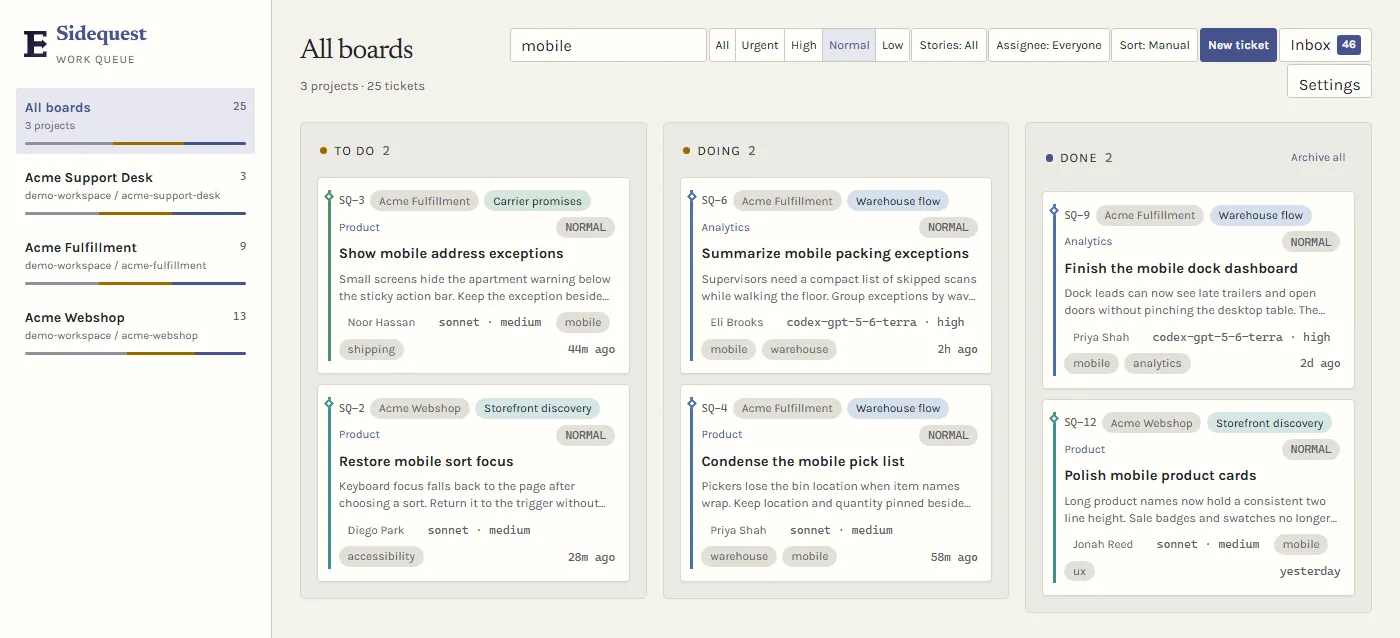
Synthetic demo data showing six mobile tickets narrowed to normal priority.
The inbox collects comments, reminders, ticket creation, and status activity across projects. Its tabs separate work that needs you from the wider activity stream.
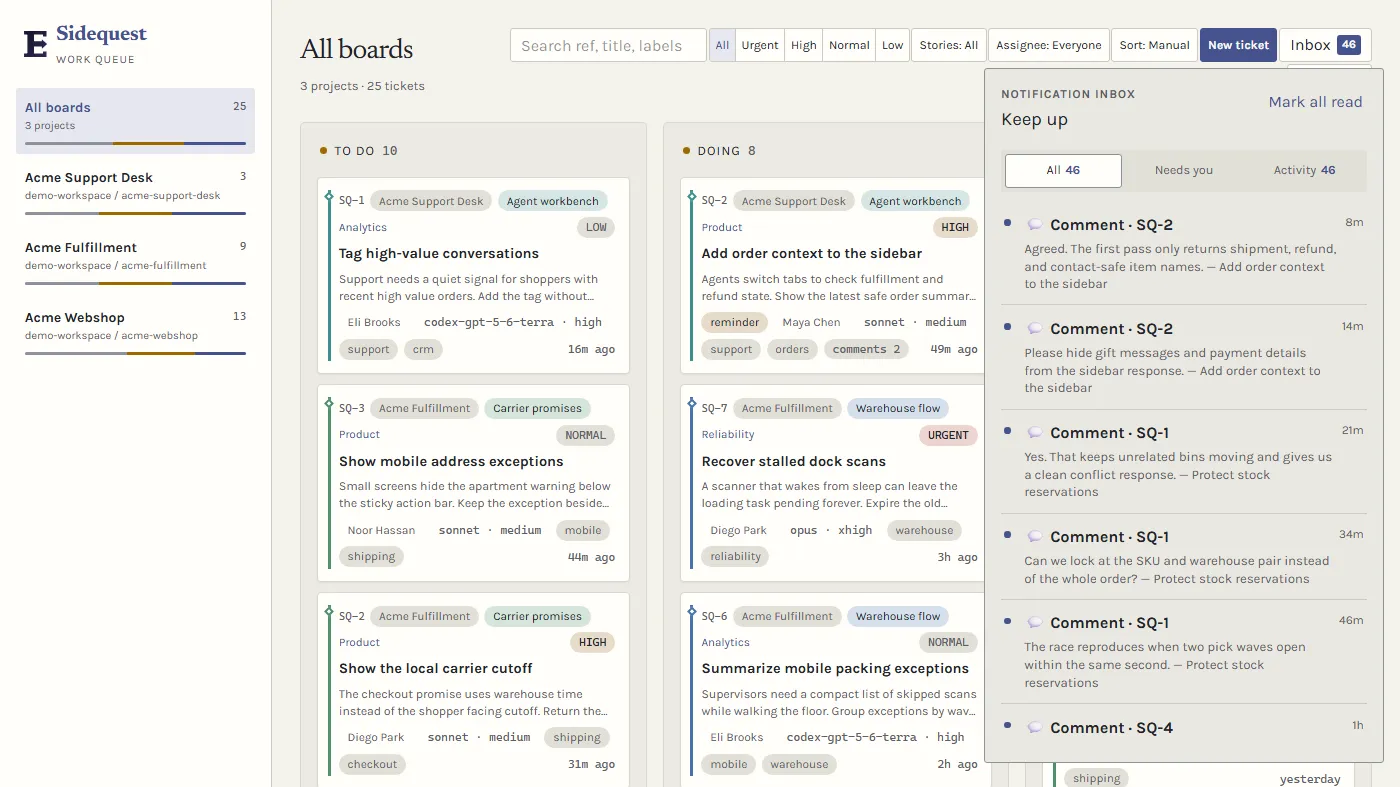
Synthetic demo data showing several unread comment notifications from different tickets.
Questions raised by background executors have their own Questions view. The list shows the question text, ticket reference, asker, whether it blocks progress, and whether it is open or already answered. It never includes answer text. Select a row to open its detail page, where you can read the full question, review its options and default, and see the activity trail.
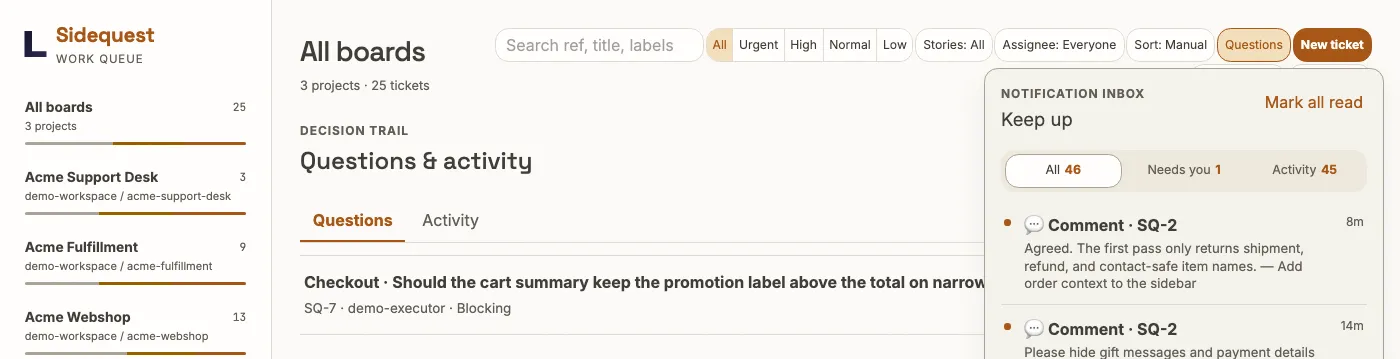
Synthetic demo data showing an open question raised by a background executor.
The detail page is also where you answer. Choose an option or enter free text, then submit your decision or decline it to use the stated default. The first answer wins, whether it comes from the dashboard or the terminal. A dashboard answer is delivered through the same route as answer, so the executor can resume its held wait or receive the decision on its next dispatch.
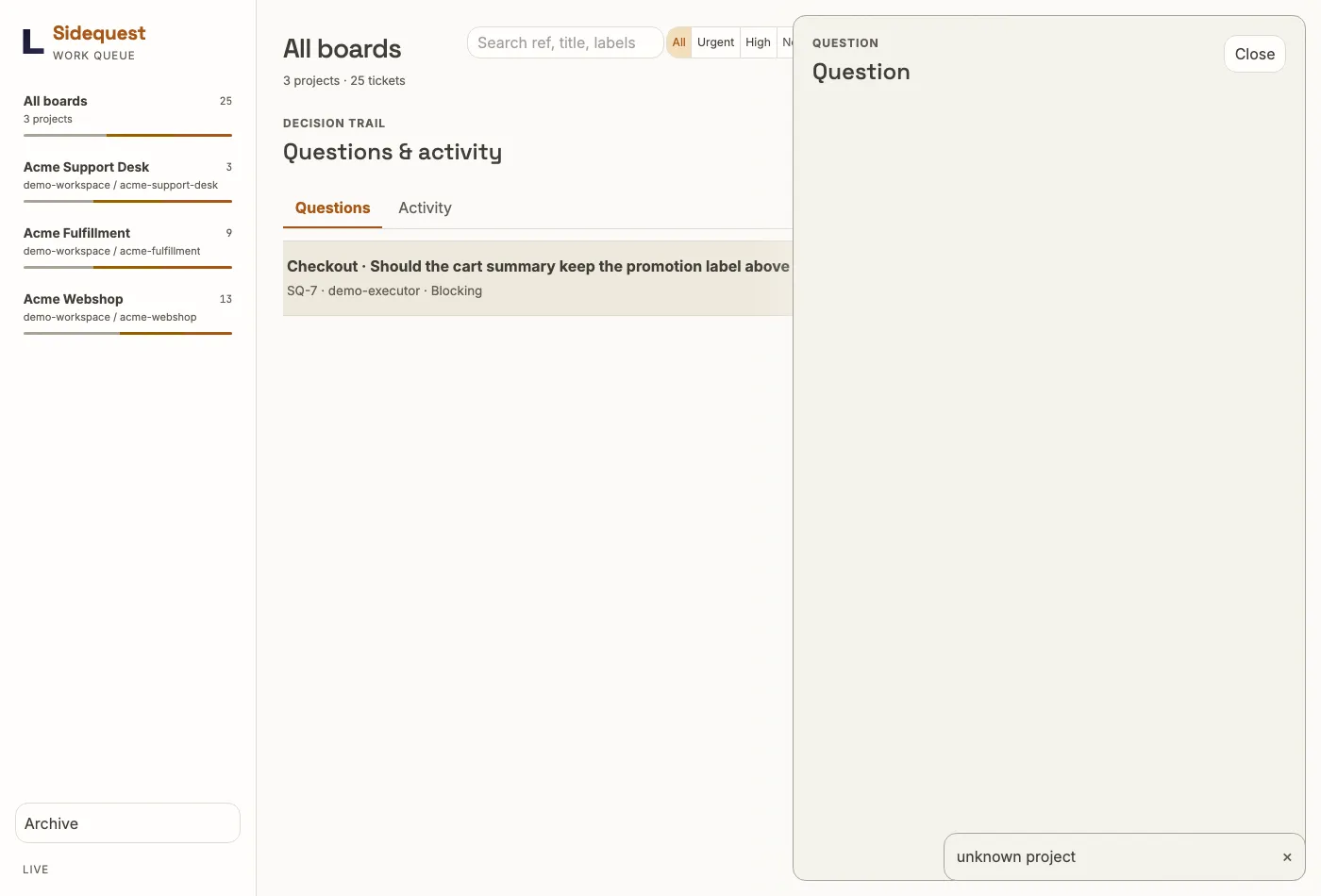
Synthetic demo data showing the question detail and answer form.
Open a ticket to edit its fields and read the working context in one place. The detail view keeps a scheduled reminder, dependency links, and the full comment thread beside the ticket fields.
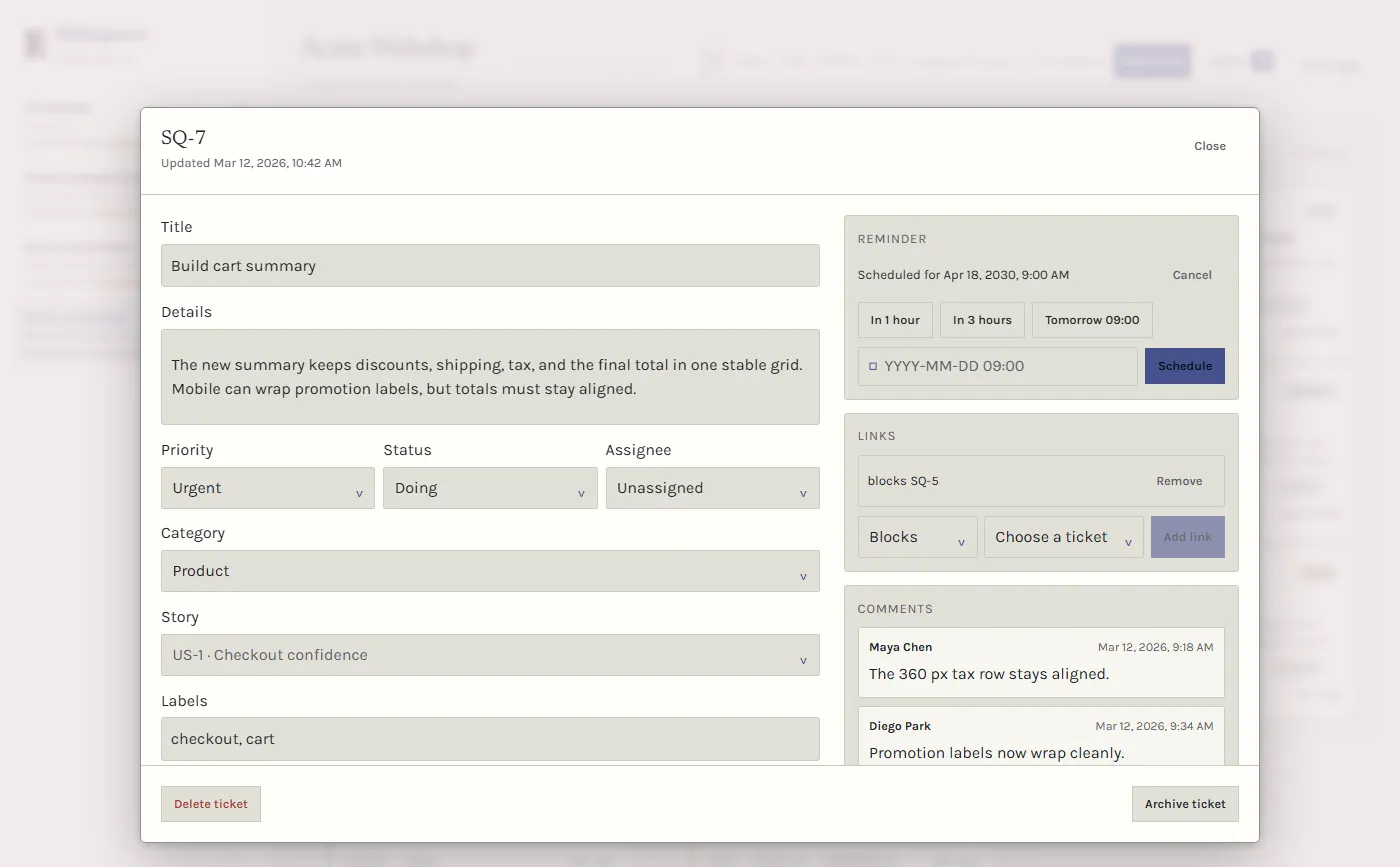
Synthetic demo data showing the Build cart summary ticket and its team discussion.
Stories group tickets into a plan you can filter and discuss before dispatch. The toolbar story filter keeps the story list visible while you scan the combined board.
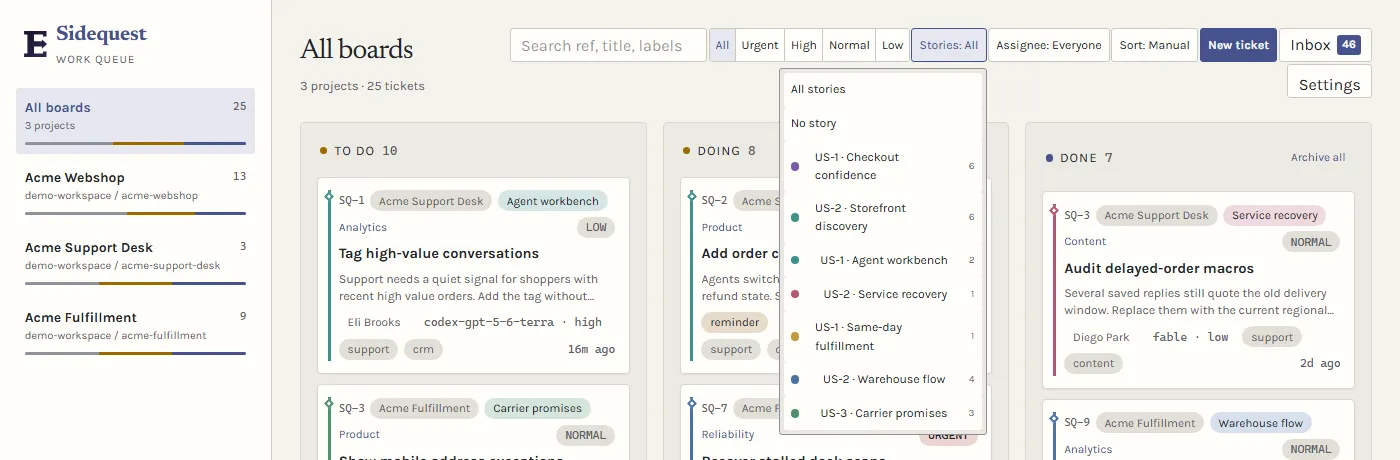
Synthetic demo data showing the Checkout confidence, Storefront discovery, and fulfillment story groups.
Links show which tickets block or relate to each other. Use the dependency list to inspect the existing chain, then choose a link type and target when you add another relationship.
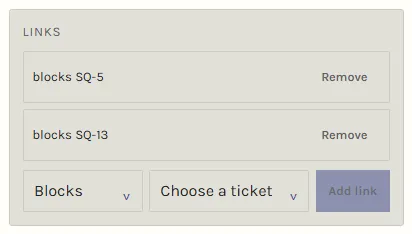
Synthetic demo data showing the existing and newly added dependencies for the Build cart summary ticket.
The lower ticket context keeps declared files, attachment previews, and the full discussion visible without putting the link picker over the comments.
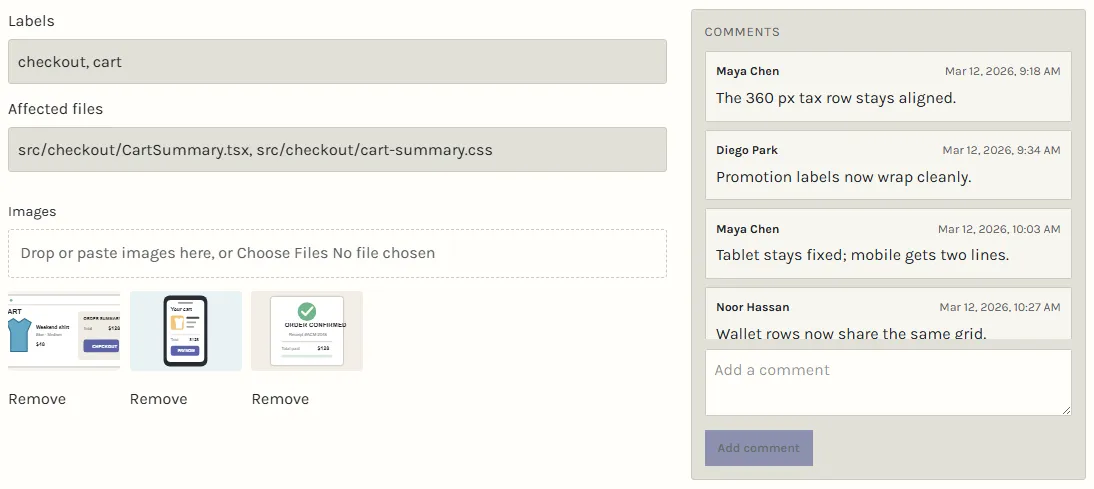
Synthetic demo data showing the declared checkout files, visual references, and team decisions attached to the same ticket.
Completed work can move into the archive without disappearing. The archive view keeps the source board, priority, age, and restore action with each ticket.
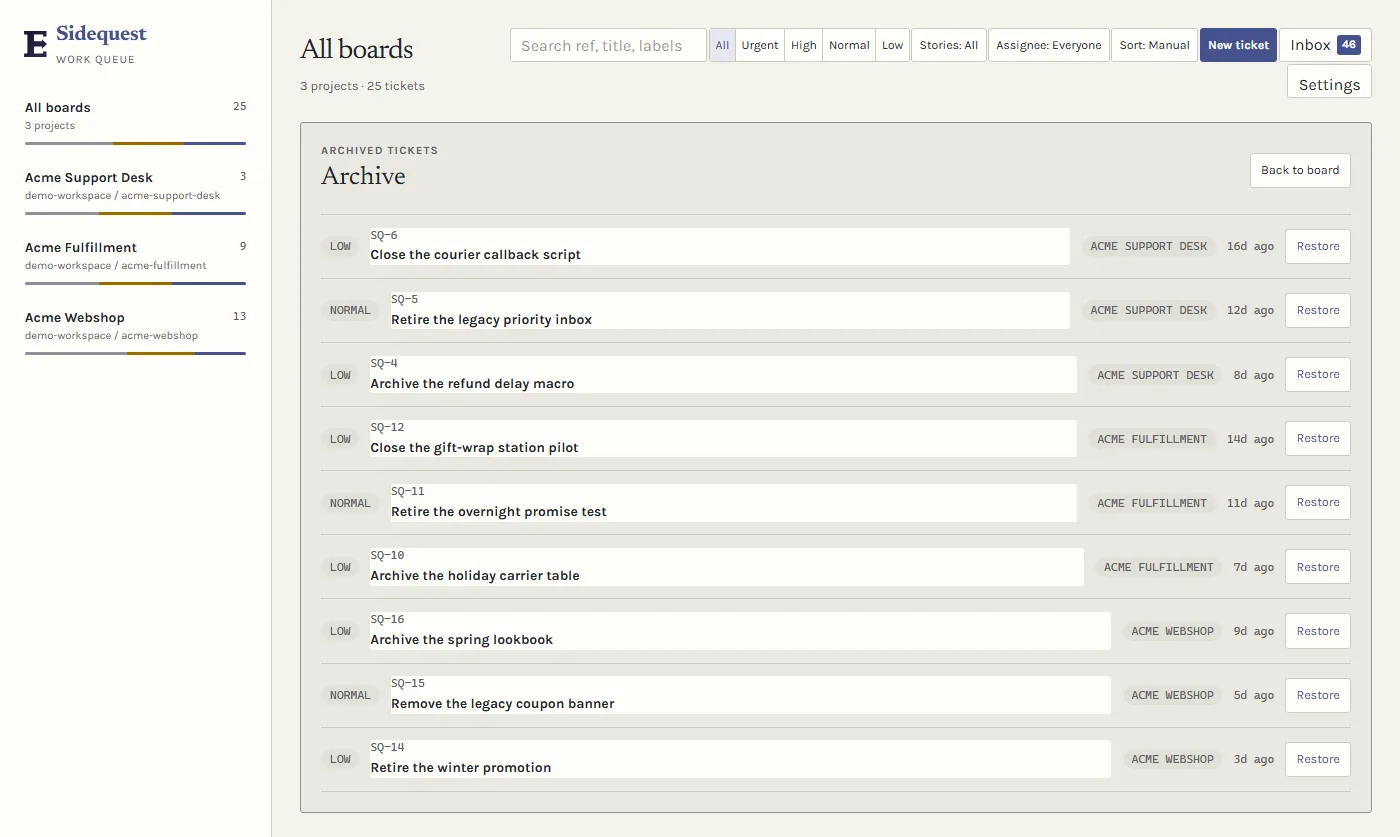
Synthetic demo data showing archived storefront, fulfillment, and support work.
Settings covers routing profiles, model fallback, theme, notification preferences, and the guided tour. Open it when you need to change how the board behaves rather than the work on a ticket.
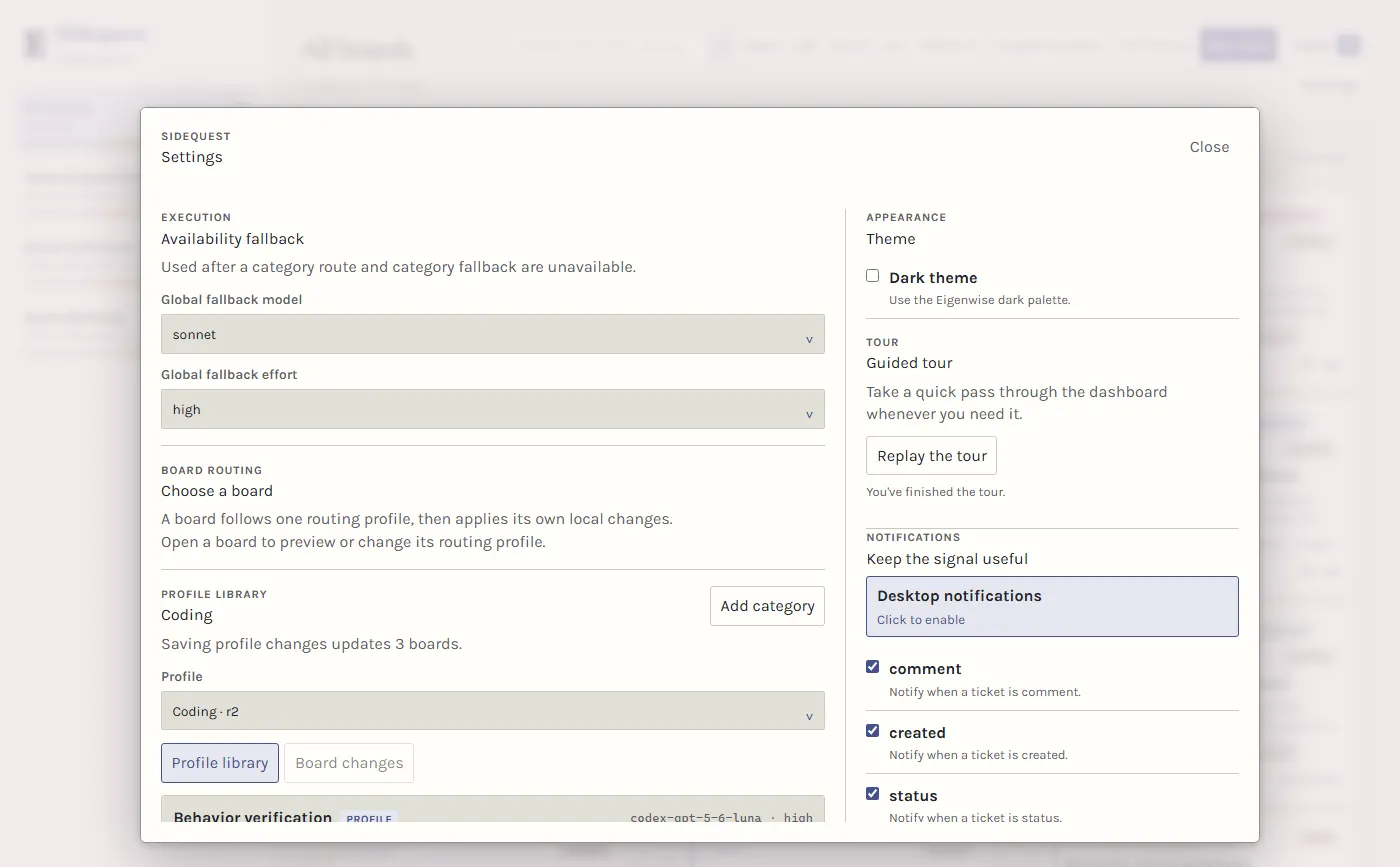
Synthetic demo data behind the Sidequest settings dialog.
Daily use
Section titled “Daily use”Ask Claude to do the board work in plain language:
Show me the Sidequest backlog for this project.What is ready to dispatch for the checkout story?Add a ticket for the empty-state bug and include the reproduction steps.What is blocking the checkout ticket?Review and integrate the checkout ticket if its verification passed.
For substantial changes, Claude can turn the request into a story with linked tickets so you can see the whole plan before execution. Side issues that come up during a session can become separate tickets instead of disappearing into the current task.
Sidequest keeps ticket activity visible in the board. Ask Claude to check active work after a restart or when you need help with a ticket that was started in another session.
When an executor needs a decision only you can make, its ticket waits in the awaiting-user status until you answer. An awaiting-user ticket is never offered as ready work and cannot be dispatched. The wait starts held: the executor keeps its claim and worktree, so your answer lets it continue where it stopped. A held wait turns released if it goes unanswered for 24 hours, if the owning session ends, if the question was never actually sent to you, or if the executor hands the ticket back on purpose. A released wait has given up its claim, and once the last question is answered the ticket returns to the ready pool and is dispatched again with your decisions included. pulse on the ticket shows how many questions are open, how long the oldest has waited, and the full text of each open question.
An executor asks through the board’s ask tool. It keeps working on whatever does not depend on your answer, and the ticket only waits once nothing else is left; a ticket dispatched again after a released wait lists your earlier answers in its briefing, so the new executor does not ask them again. Every question states what the executor will do if you never answer. The board records the question and hands the executor the message to send to your session, because the board server cannot send messages itself. Claude in your session puts the question to you, then records your reply with answer. That reply goes back to the executor as a message. It is also attached to the executor’s next board reply, so an answer is not lost if the message is missed. If you would rather not decide, say so: a declined question tells the executor to go ahead with its stated default. When Claude decides something for you instead of asking, the executor is told the decision did not come from you. An answer settles a design or behavior question and nothing more. It never grants permission, file scope, or a settings change, and those still go through their own approvals.
Some work cannot start at all until you decide something. Claude can say so when it files the ticket, by giving the question as needsInput on add, or on update for a ticket nobody has started yet. The ticket is created already waiting in awaiting-user, released, with that question open, and dispatch refuses it, naming the question to answer first. Answer it and the ticket returns to the ready pool. Decline it and the ticket is ready too, and the executor will ask you at runtime if it still needs to.
Open questions also reach your session without the message. Sidequest’s hooks show Claude one open question each time it finishes a turn, blocking questions first. Claude also sees the newest question when you send a message, and a one-line list of what is still open when a session starts or is compacted. A question normally goes to the session that dispatched its executor. If that session has ended, or nobody has seen the question for ten minutes, any session open in the project gets it. An executor that tries to stop with a blocking question it never sent is stopped once and told to send it. Only your session can record an answer: an executor cannot answer its own question or another executor’s, and a hand-written question marker that names no real question is refused.
The one other place you can answer is the dashboard. When you are away from the terminal, open the question from the dashboard’s Questions view, pick an option or type a reply, and send it, or decline. The dashboard records it the same way as an answer in your session, marked as coming from the dashboard, and it reaches the executor by the same route. The first answer wins. If the question was already answered somewhere else, the dashboard says so and shows the recorded answer instead of replacing it.
Where the non-Claude models come from
Section titled “Where the non-Claude models come from”Routing can send a ticket to a non-Claude model, and Sidequest finds those models in two places. If Model Gateway is installed, its published catalog is read directly. Sidequest also asks whichever endpoint ANTHROPIC_BASE_URL points at for its model list, the same list Claude Code reads for its own /model picker, so a relay you run yourself contributes models without Model Gateway being installed at all. The two sources combine: a model both of them publish keeps its Model Gateway name, so existing routes are never renamed, and an endpoint-only model is added alongside. First-party Claude models are never treated as external, so pointing the variable at the real API changes nothing about routing.
If a routing profile offers fewer models than you expect, ask Claude to check model readiness. It will say which source answered, so you can tell “Model Gateway reports its backend as down” apart from “the endpoint never answered”.
A model going unready does not repoint your routes. A gateway restart, or a catalog Sidequest cannot refresh, makes a model temporarily unlistable, but a category already routed to it stays routed to it: a dispatch in that window is refused with the readiness message rather than quietly handed to a Claude model. A profile only gains a non-Claude route, never loses one, so once the gateway publishes a model the route sticks until you change it. Restart the gateway and retry, or edit the category if you want it to run on Claude.
Deliver through pull requests
Section titled “Deliver through pull requests”By default, Sidequest uses local delivery: integrating a wave advances the board’s integration branch in your checkout. Local mode remains the default and its behavior is unchanged. From Sidequest 5.10.0, repositories that require every change to arrive through review can opt into PR delivery with the board’s deliveryChannel setting:
{ "deliveryChannel": { "mode": "pr" } }The PR channel defaults to mode: "local" when it is omitted. Its remote defaults to origin, and its base branch defaults to the board’s integrationBranch (normally main). Set remote or target only when the repository uses different names. The CLI shorthand is:
sidequest board-config --delivery-channel prDo not confuse deliveryChannel with delivery. The latter remains the git strategy used to apply a wave (merge, replay, or apply); the channel decides whether the result lands locally or through a pull request. Agents configure the channel through the board_config MCP tool.
With PR delivery, the flow is:
- Run
integrate. Sidequest fetches the configured remote, assembles the wave from the target branch in a temporary worktree, pushessidequest/wave/<wave-id>, opens one pull request for the wave, and enables auto-merge. - The pull request runs CI. The aggregate
test-gatecheck is the wave gate. The tickets remain awaiting merge rather than being marked delivered. - Run
integrateagain after the PR merges. Sidequest reconciles the PR, verifies the merge commit reached the target branch, and closes the participating tickets.sidequest watchor ticket pulse can alert you when the PR becomes merged or fails, with guidance to runintegrateto close it.
If integrate is interrupted while opening the PR, for example the process is killed after the push or after auto-merge was enabled, just run integrate again. Sidequest records the open before it pushes, so the rerun picks up the branch or PR it already made instead of refusing it. A branch or PR that does not match that record still refuses, and Sidequest never force-pushes over it.
Before enabling PR delivery, the repository must have GitHub auto-merge enabled, a ruleset requiring the aggregate test-gate check, and an authenticated gh CLI with permission to fetch, push, open PRs, and enable auto-merge. Auto-merge is a GitHub request, not proof that the PR landed. If it appears green but does not merge, explicitly merge the PR when policy allows and confirm that the target branch actually moved before running integrate again.
PR delivery never silently falls back to a local merge. Common outcomes are:
wave_ci_failed: CI failed. Inspect the named failing checks and the PR, fix or rework the candidate, then retry integration as appropriate.wave_pr_closed_unmerged: the PR was closed without merging. To deliver the tickets, assemble a new wave from them. The new wave opens its own PR on its own branch, and the closed PR stays with the wave that opened it, so a later wave never inherits it. Rework only a ticket whose change caused the close; the others need no rework. Reopening the closed PR helps only if its branch still holds what should land.pr_delivery_unavailable: Sidequest could not usegh, the configured remote, or GitHub authentication. Install or authenticategh, fix the remote or permissions, and retry; it does not switch to local delivery.wave_merge_unreachable: GitHub reports a merge, but the merge commit is not yet reachable from the configured target branch. Wait for the remote to catch up, then runintegrateagain.wave_delivery_error: the wave could not be built in its temporary worktree, so nothing was pushed and no PR was opened. The message names the git step that failed. If it says the step timed out or was killed by a signal, the machine was overloaded, and it is safe to runintegrateagain once load drops. Any other git failure needs its cause fixed first.
Optional destination settings can be supplied together:
sidequest board-config --delivery-channel pr --delivery-remote upstream --delivery-target release/nextsidequest board-config --delivery-channel none clears the channel and returns the board to local delivery. Local mode documentation and behavior stay as they were.
Keep GitHub issues aligned
Section titled “Keep GitHub issues aligned”Link a GitHub issue to its execution ticket when that issue should follow the delivery lifecycle. Agents use the issue_link MCP tool; the CLI equivalent is:
sidequest issue link SQ-123 https://github.com/owner/repo/issues/42Use sidequest issue list SQ-123 to see the links and sidequest issue unlink SQ-123 <url|#N> to remove one. A link is explicit: Sidequest never treats a ticket title, a comment, or a TRACKS convention as permission to change an issue.
sidequest audit is report-only by default. It summarizes four things: board tickets whose fix looks landed, open GitHub issues with no ticket, linked issues whose state or labels differ from the board, and any unavailable GitHub or Git evidence. sidequest audit --apply performs only the proposed actions for linked issues. It never changes unlinked issues, creates tickets, or closes board tickets.
For a linked issue, todo tickets leave it open with no Sidequest status label. Doing, awaiting-user, awaiting-oracle, and pending-submission work is open with status:in-progress; done but unreleased work is open with status:in-testing. When every linked ticket is released, Sidequest removes those status labels, posts one release marker comment, and closes the issue. Applying the same audit again is safe: existing labels and release comments are not duplicated.
Mirror bugs and features automatically
Section titled “Mirror bugs and features automatically”Hand-linking covers issues that already exist. The issue mirror runs the other direction: it files a GitHub issue for board tickets that users would want to see, so the issue list reflects the product work without exposing internal fix-ups, reviews, explorations, or planning tickets.
It is off until you configure a filter:
sidequest board-config --issue-mirror '{"enabled":true,"labels":["bug","feature"]}'The filter takes labels, categories, and stories; a ticket mirrors when it matches any of them. Categories are opt-in by name, and review, audit, research, lookup, exploration, planning, and grooming categories never match unless you list that exact category yourself. Turn the mirror back off with --issue-mirror off.
A mirrored ticket gets an issue on the project’s origin repo, and Sidequest records it as an ordinary link, exactly as issue link would. From that point the lifecycle above owns it: status labels, the release marker, and close-on-done. There is no second sync path, and a ticket you linked by hand is never mirrored on top of.
Ticket labels map to repository labels (bug to bug, feature to enhancement by default, overridable with labelMap). Sidequest only sends a label the repository already defines.
The issue is a rewrite, not a copy. Sidequest publishes an allow-list of two fields, the title and the description, so a field added to tickets later cannot start leaking. Both are scrubbed of board refs, board slugs, absolute paths, hostnames, session and worktree ids, tokens, cost figures, and other projects’ names. If a rendering still trips the detector after scrubbing, Sidequest skips that ticket and warns instead of publishing it.
Mirroring obeys the same --apply rule as everything else. sidequest audit plans from board state alone, costs no extra GitHub call, and prints would create issue for SQ-123 .... Only sidequest audit --apply creates anything. Review a dry run before you first enable the filter: every matching open ticket is mirrored on the next apply, so a broad filter on a long-running board files a lot of issues at once.
SessionStart runs the audit in report-only mode with a short background budget. When it finds something, the session context contains one summary line such as sidequest audit: 2 untracked issues. Run sidequest audit for detail. It stays quiet when every count is zero and never blocks startup. A release cut with --push runs sidequest audit --apply after publishing its tag; --dry-run runs the report mode only. Audit failures are warnings and never roll back a release cut.
Split boards by account
Section titled “Split boards by account”Every board lives in the database of one Sidequest home. When SIDEQUEST_HOME is unset, the home follows CLAUDE_CONFIG_DIR: a session started with CLAUDE_CONFIG_DIR=~/.work/claude uses ~/.work/claude/sidequest, and a session started with ~/.personal/claude uses ~/.personal/claude/sidequest. Boards created while every session shared one home stay in that home until you move them.
sidequest move-board moves whole boards from one home to another:
# See exactly what would move. Nothing is written, and the destination is not created.sidequest move-board my-repo other-repo --from-home ~/.work/claude/sidequest --to-home ~/.personal/claude/sidequest --dry-run
# Move them.sidequest move-board my-repo other-repo --from-home ~/.work/claude/sidequest --to-home ~/.personal/claude/sidequest
A board can be named by its slug, its display name, or its repository path. --from-home defaults to the current home. Add --json for the full plan.
What moves: the board’s tickets with their comments, claim history, submissions and dispatch records, its stories, links, categories, board config and notifications, and everything under projects/<slug>/ (assets, plans, verification logs). Dispatch token files the tickets name move too, and paths inside the board that pointed at those files are rewritten to the destination. Routing profiles the board uses are copied when the destination lacks them and stay in the source for the boards still there. Ticket ids and refs do not change, so refs/sidequest/<ref> pointers in the repository stay valid and new tickets continue the ref sequence.
What stays: existing worktrees. They are registered with Git at their current paths and keep working where they are, so a submission parked before the move integrates from the destination home. New dispatches create worktrees under the destination home. Remove the old ones with git worktree remove once their work is integrated.
The move refuses, and names the cause, while any board it moves has a claimed ticket, a launched or bound dispatch, or a held publish lock. It also refuses when the destination already holds a board with the same slug that has tickets the source does not, or a different routing profile with the same name. A destination copy that is empty or left by an interrupted move is replaced. The destination database is created when absent. The source rows are deleted only after the destination copy commits and its per-table row counts match, so a crash at any point leaves the board in at least one home, and running the same move again finishes it.
Remove a global SIDEQUEST_HOME pin afterwards
Section titled “Remove a global SIDEQUEST_HOME pin afterwards”A shell profile that exports SIDEQUEST_HOME pins every account to one home and overrides the per-account default. Once each board sits in the home for its account:
- Move the boards that belong to the other account, as above.
- Delete the
export SIDEQUEST_HOME=...line from your shell profile, or anyenvblock that sets it. - Start a new shell and a new Claude Code session for each account. Run
sidequest projectsin each and check it lists only that account’s boards.
Keep the old home until the second account has used its boards for a while. Its database still holds every board you did not move.
If something stops working
Section titled “If something stops working”The board does not open. Reload Claude Code after installing Sidequest, then ask Claude to open the board again. If the browser still does not open, ask Claude to start the Sidequest dashboard and report its local URL.
Claude reports an older loaded Sidequest after an upgrade. Reload plugins or start a new session to pick up the current connection and packaged executor roster. Unknown versions, schema changes, and incompatible older loaded versions refuse dispatch until reload.
Claude says an executor is missing. Update Sidequest, reload plugins in the affected session, and ask Claude to dispatch again. Do not create replacement agents or disable the dispatch guard. Executors for an external model are registered when that model is first routed, because which external models exist is only known once the gateway reports them, and a session that was already running has not loaded the new one yet. Claude is told when a dispatch registered one, so it can reload before it spawns. These definitions go in your Claude Code agent directory, the same place your own agents live; a separate Sidequest storage location, if you have set one, holds board state only and is never read for them.
A ticket will not dispatch. Ask Claude to diagnose the ticket. Common causes are an incomplete work description, a blocked dependency, or an unavailable configured route. Claude reports the specific recovery instead of silently changing the work’s route.
An executor died the moment it started, and the ticket will not take a replacement. This is what a failed model request looks like: the executor is told to use a model its endpoint rejects, so it never gets as far as its first action. Sidequest normally learns an executor finished from the executor itself, and an executor that died this early never reports anything, so the board protects the attempt for an hour in case the work is merely slow to start. Claude no longer has to wait that hour: your session tells it that the task failed, and because that report names the same task Sidequest recorded when it started, Claude can retire the dead attempt straight away and dispatch a replacement. Ask Claude to diagnose the ticket and it reports whether it retired the attempt on that evidence or is still waiting out the hour. If the model itself is what failed, fix the route or the endpoint first, or the replacement dies the same way.
A read-only ticket cannot start in a new repository. Claude reports the checkout choice and keeps the ticket read-only. You do not need to commit notes or change board settings.
A worktree-isolated executor cannot write. Ask Claude to redispatch if the recorded checkout is missing or does not match the assigned checkout.
An executor cannot write in another repository you approved. Declared files only name paths inside the project, so a checkout of a different repository (for example a branch worktree you approved for a related change) has no write lease. Ask Claude to grant that checkout’s absolute root on the ticket with update and externalWorktrees. The executor can then write under exactly that root while it holds its claim. The board never commits there, a grant can never point inside the project, and an executor cannot grant one to itself.
Work looks stuck in doing. Ask Claude to inspect the ticket’s current status and executor activity. Sidequest keeps the intended integration branch that was frozen at dispatch, even if you later change branches or the board default. For two feature branches, name the intended target on each ticket instead of changing that board-wide default between dispatches.
Executors stall or die with [Request interrupted by user] while the laptop lid is closed. A Mac in Clamshell Sleep on battery runs nothing except seconds-long maintenance wakes, so a model request that starts in one wake cannot finish before the next sleep, and Claude Code’s stream watchdog later records the interruption. That is not a model or gateway problem. Sidequest checks the macOS power log (pmset -g log; on other systems, a jump between the wall clock and the monotonic clock) and reports such a ticket as host_sleep instead of dead or stalled. It keeps the claim so the same executor can resume, and Claude is told not to change model routes because of it. For long unattended runs, keep the machine awake: run the session under caffeinate -is, or stay on AC power with the lid open.
A ticketed helper is refused while writing verification evidence. Only the ticket’s active owner and helpers admitted through that owner’s recorded identity can write the ticket’s exact board-owned evidence directory. Helpers cannot use another ticket’s folder or a lookalike path. Ask Claude to inspect the ticket binding, not to request repository scope.
Two executors’ temporary files collide. Claude Code gives every executor its orchestrating session’s scratchpad, so executors running side by side share one directory. Each executor’s briefing names a subdirectory of its own, <project>-<ticket>-d<launch>, and tells it to keep every temporary file there and leave the scratchpad root alone. A generic file such as negative-control.js at the scratchpad root means an executor ignored that rule; ask Claude to check the affected worktrees for a source file that was swapped out for a control and not restored.
Stale agent worktrees keep accumulating. Ask Claude to inspect local worktree storage and clean up entries it can safely remove. The generated reference has the lifecycle and recovery details.
A ticket contract forbids commits. Ask Claude to declare working-tree delivery before dispatch. After verification, the declared edits stay uncommitted and unpushed in the shared checkout for your normal team handoff. Ticket closure records that handoff; it does not replace your project’s commit, review, or push process.
A verify command keeps timing out on a busy machine. Each captured verify run has a time budget: a fixed setup allowance, plus extra time for test-suite commands (npm run test:full or its direct entry point node scripts/test-full.mjs, any node --test run, or any npm test script) that grows with how loaded the machine is. A run that hits the budget reports capture_budget_exceeded along with how long it ran, the budget and the load. That means it ran out of time, not that a test failed. Ask Claude to rerun the capture with SIDEQUEST_FULL_SUITE_PHASE_BUDGET_MS set higher. That setting only ever adds time, and every capture still stops at a two-hour hard limit, so a hung run cannot block other verifications forever. If a run needs more than that, ask Claude to pin a narrower verify command for the ticket. Only a ticket-bound capture of the full suite (npm run test:full or node scripts/test-full.mjs) waits its turn for the capture slot, and that slot is per project: it keeps two full-suite captures in the same project apart, but captures in other projects on the same machine are not serialized against it, so keeping different projects’ suites from overlapping is up to you. A suite run straight from a shell, or through the wrapper without a ticket, does not, so its load lands on whatever capture is running beside it. Sidequest’s own test waits widen with that load rather than failing under it, but other projects’ suites may not, so avoid running ad-hoc full suites beside a pinned verification.
A verify run is refused with “Dependencies are not installed”. A Sidequest worktree is a fresh Git checkout, and node_modules is gitignored, so a new worktree has no installed packages. Only a verify command derived from a plugin’s named suite installs its own (npm ci, for that one plugin). Before running a verify command, Sidequest checks each package the command runs scripts in (npm --prefix <dir> run ..., cd <dir> && npm test, and the pnpm and yarn equivalents). If a package declares dependencies but has none installed, the run is refused as toolchain_missing. The refusal names the package and the install command. Previously the command ran and failed with tsx: not found or a missing type definition, which looked like a code defect. The refusal never rejects a candidate, and a wave gate refused this way reports an environment problem rather than a failed gate. The executor installs the dependencies in its worktree and reruns the capture, which leaves the tree clean. To provision every new worktree up front, ask Claude to set the board’s worktreeSetup command (for example npm --prefix plugins/sidequest ci) or worktreeDependencyPaths with board_config. A command that installs its own dependencies skips the check.
A verify run takes longer than ten minutes. Claude Code stops a single shell command after ten minutes, which is shorter than a slow suite can need on a loaded machine (a Rust crate run beside another executor took about eleven). Executors therefore start the captured verify with --detach: the run moves into its own process group, keeps its own time budget, and cannot be stopped by that ten-minute limit. The executor waits on it for up to nine minutes at a time. If it is still going, the wrapper prints verify=running with a --resume command, and the executor reruns that command until the final verdict arrives. The capture is recorded exactly as an attached run would be.
A capture run without --detach is still at the mercy of Claude Code’s limits. A command longer than ten minutes gets moved to the background, where it is stopped after thirty minutes unless the call set a longer timeout, and a wrapper stopped that way records nothing at all: no pass, no fail, no budget verdict. Before it starts the command, the wrapper prints the timeout such a call needs (its budget plus a ten-minute margin, at most two hours), and the closing capture-budget line repeats it as harnessTimeoutMs. If the budget is too close to two hours for any timeout to outlive it, the wrapper says to rerun with --detach instead.
Submit keeps refusing work whose captures failed only because the machine was overloaded. When captured verify runs of the exact candidate keep timing out or failing the suite because of host load, not because of the change, the verification_capture_required refusal names a waiver. Do not hand-edit refs/sidequest refs to get past it. Ask the orchestrating Claude session to post the waiver comment the refusal prints, [sidequest:capture-waiver] capture=<id> signature=<status[:exit-N]> authority=<who>; <reason>, with its own recorded by identity, and resubmit the same candidate. A waiver covers one timed-out or failed-suite capture of that candidate, verify command and dispatch attempt, and its signature must match the recorded failure. The executor that did the work cannot waive its own capture, and the authority= field does not override the comment’s recorded author. The submission is recorded as skipped with the waiver attached, and integration still runs the verify command.
Every submit comes back executor_verify_mismatch. The refusal prints Expected command: followed by the exact command the submission had to reproduce, so compare it against what the executor actually ran: the two have to match byte for byte, and a reformatted or retyped equivalent does not count. The usual cause is a gate the ticket never chose, because a ticket recording no verify command of its own has one derived for it. If the expected command is not the one you want, ask Claude to pin it on the ticket, then dispatch again.
An executor ran a much bigger test suite than the ticket asked for. A ticket that records no verify command of its own does not dispatch without a gate; Sidequest derives one from the ticket’s files, which for a plugin ticket is that plugin’s whole suite. That is no longer silent: the dispatch result warns that the requirement was derived rather than taken from the ticket, and names the command it pinned, and the same notice appears in the ticket’s pulse. Ask Claude to pin the narrower command you actually want before dispatching, which clears the notice.
A pinned node --test command is refused for missing a loader or a preload. A bare node --test <files> only works where the package it belongs to can load those files on its own. Where the tests are TypeScript and the package is not "type": "module", Node strips the types, reads the files as CommonJS and loads no tests at all, which reports as a test failure seconds after it starts. The same bare form also drops any --import preload the package’s own test script carries, and such a preload is often what points a suite’s state at a sandbox instead of your real files. So the refusal names the package’s own test script and the npm run <script> -- <files> form to record instead. Pin that, rather than reaching for the raw command.
A submitted ticket is not integrated. Ask Claude to inspect the submission and complete the review and integration step. Do not start the same ticket again while a submitted result is waiting.
A wave left out submitted work. Ask Claude to inspect the assembled wave and its declared participant set. Active or accepted pending candidates with overlapping scope belong in the wave. Review-rejected candidates stay visible for later supersession and do not block an accepted repair wave.
A submission sat so long it can no longer be integrated. Ask Claude to check whether the requested behavior already reached the intended branch. If it did, Claude records that evidence; if it did not, the work needs a fresh ticket against current source.
The board feels slow, or hooks stall, when many projects are busy at once. Every project shares one board database, and a database file takes one writer at a time, so a long write in one project can make another project’s hooks wait. Sidequest can measure that instead of guessing. Set SIDEQUEST_LOCK_TRACE=1 for the sessions you want measured and it appends one JSON line per board write to lock-trace.jsonl beside the board database, recording which board operation it was, how long it waited, whether it was ever actually blocked, and how long it held the lock. Then ask Claude to summarise the trace, or run node <sidequest plugin>/lib/lock-trace.js yourself, which breaks the counts, the median and worst waits, and how many writes gave up waiting down by the board function that held the lock, so a slow stretch points at something you can act on rather than just at the database. Leave the setting unset the rest of the time: tracing is off by default and writes nothing, which keeps it off the path of every hook in every session.
See the generated Sidequest reference for agent-facing tool and configuration details, or the Sidequest plugin README for the project landing page.